Design a Distributed Email Service
Email is the oldest system in this series by decades. SMTP was specified in 1982. POP and IMAP followed. Those protocols still carry the world’s mail, and they were designed for an internet of a few thousand machines where you downloaded your messages and the server forgot them.
Now Gmail has over 1.8 billion users.
This chapter is about what happens when you keep the interface and replace everything behind it. And it produces the largest numbers we’ve seen — by a wide margin.
Step 1 — Scope
Requirements
- Send and receive emails
- Fetch all emails; filter by read/unread
- Search by subject, sender, and body
- Anti-spam and anti-virus
- Attachments
Client-to-server communication is over HTTP, not the legacy protocols — though servers still speak SMTP to each other, because that part is not negotiable.
The numbers
This is where email distinguishes itself.
1 billion users
Sending:   1B × 10 emails/day  ÷ 10⁵  = 100,000 QPS
Receiving: 40 emails/day per user
Now storage, for one year:
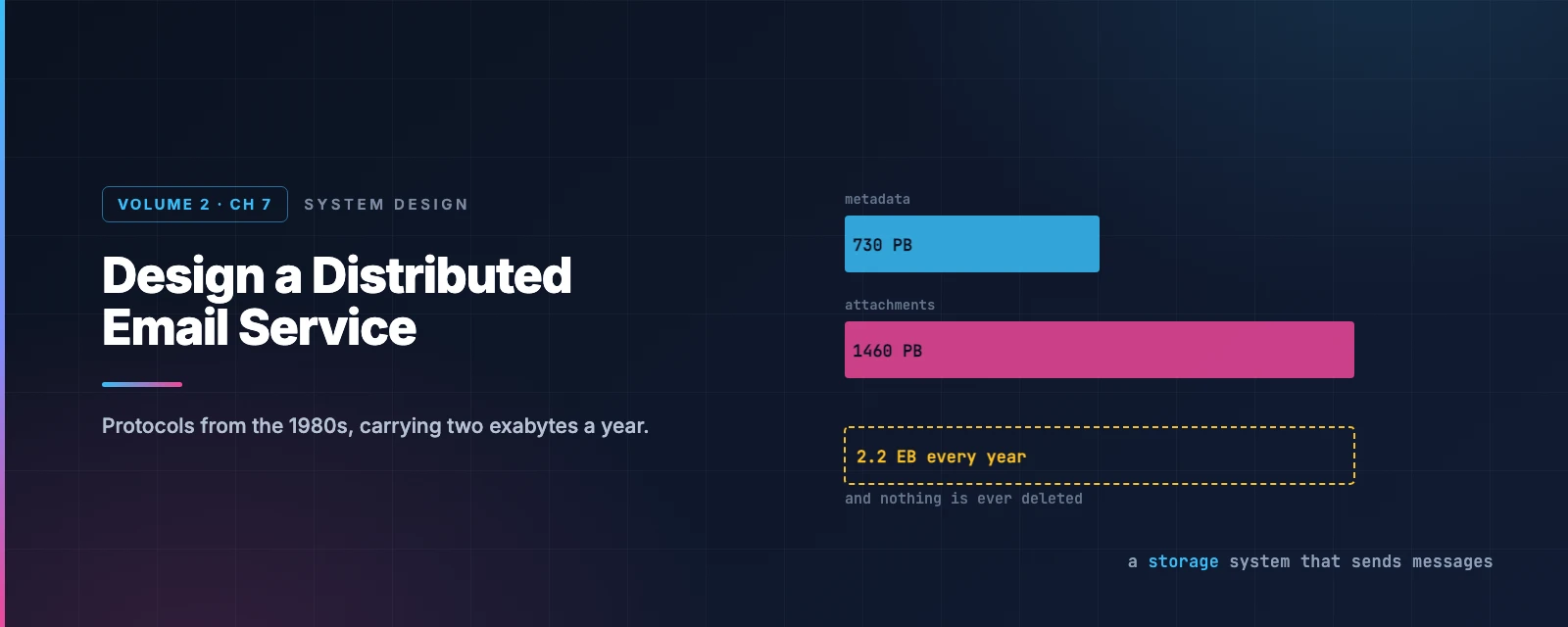
Metadata:    1B users × 40/day × 365 × 50 KB          =   730 PB
Attachments: 1B × 40/day × 365 × 20% × 500 KB         = 1,460 PB
                                              Total   ≈ 2.2 EB
Two exabytes per year. For comparison, Google Maps’ entire global tile set was about 100 PB — a one-off cost. Email adds twenty times that every year, and never deletes any of it.
This is a storage system that happens to send messages. Every other decision follows from that.
Worth being precise about one figure: the 50 KB “metadata” average includes the message body, which is why it’s so much larger than a header. Bodies are what make email heavy — HTML mail routinely exceeds 100 KB.
Step 2 — High-level design
Why the old protocols don’t fit
SMTP sends mail between servers. Still universal, still fine.
POP downloads messages to one device and deletes them from the server. That made sense when storage was expensive and you had one computer. It’s incompatible with reading your mail on a phone, a laptop, and a watch.
IMAP keeps mail on the server and downloads on demand — much better, and still the dominant protocol for native clients.
But none of these were designed for threading, labels, full-text search across half a million messages, or push notification. They’re transfer protocols, and modern email is a database with a transfer protocol attached.
Hence HTTP for the client, and a real storage layer behind it.
The traditional design, and why it broke
Old mail servers used Maildir: one file per message, in per-user directories.
Simple, and it fails on three counts at scale. Disk I/O becomes the bottleneck — millions of small files is close to the worst case for a filesystem. Backing up billions of files is impractical. And a single disk is a single point of failure, which violates the one requirement email cannot compromise on: do not lose mail.
Architecture
flowchart TD
    W["Webmail client"] -->|HTTPS| WS["Web servers
email APIs"]
    W -->|WebSocket| RT["Real-time servers
push new mail"]
    WS --> MD[("Metadata DB
headers, bodies")]
    WS --> AT[("Attachment store
S3")]
    WS --> C[("Distributed cache
Redis — recent mail")]
    WS --> SE[("Search store
inverted index")]
    RT --> C

    style MD fill:#dbeafe,stroke:#2563eb,color:#1e3a8a
    style AT fill:#fef3c7,stroke:#d97706,color:#78350f
    style SE fill:#dcfce7,stroke:#16a34a,color:#14532d
    style RT fill:#fce7f3,stroke:#db2777,color:#831843
Attachments go to object storage, not the database. Cassandra technically supports blobs up to 2 GB, but the practical limit is under 1 MB — and large blobs destroy the row cache. Attachments reach 25 MB. They belong in S3, with only a reference stored alongside the message. (Same reasoning as routing tiles in the maps chapter: store-and-fetch-by-key doesn’t need a database.)
Real-time servers are stateful, holding WebSocket connections for push. Long polling is the fallback where WebSocket isn’t available.
Sending
sequenceDiagram
    autonumber
    participant U as User
    participant LB as Load balancer
    participant WS as Web server
    participant Q as Outgoing queue
    participant SW as SMTP workers
    participant R as Recipient server

    U->>LB: send email
    LB->>WS: rate limited, routed
    Note over WS: validate size, check spam and virus
    alt recipient is on our domain
        WS->>WS: write to sender Sent + recipient Inbox
        Note over WS: never leaves the building
    else external recipient
        WS->>Q: enqueue
        Q->>SW: pull
        SW->>R: SMTP
        Note over SW,R: retry with exponential backoff
if the recipient server is down
    end
Two details worth pulling out.
Same-domain mail short-circuits entirely. Gmail to Gmail never touches SMTP — it’s two database writes. At Gmail’s share of the market that’s an enormous fraction of all mail avoiding the network path.
The outgoing queue is the retry buffer. Recipient servers go down; you cannot drop the message. Exponential backoff, and the queue depth becomes a health metric — a growing backlog means either a dead recipient or too few workers.
Receiving
flowchart TD
    EXT["Incoming SMTP"] --> LB["SMTP load balancer"]
    LB --> SMTP["SMTP servers
acceptance policy — bounce invalid early"]
    SMTP --> BIG[("Attachment store
if too large for the queue")]
    SMTP --> Q{{"Incoming queue"}}
    Q --> MW["Mail processing workers
spam filtering, virus scanning"]
    MW --> ST[("Storage layer
metadata, cache, objects")]
    ST -->|"user online"| RT["Real-time servers → WebSocket push"]
    ST -->|"user offline"| WAIT["Waits until they connect"]

    style Q fill:#fce7f3,stroke:#db2777,color:#831843
    style MW fill:#dcfce7,stroke:#16a34a,color:#14532d
    style ST fill:#dbeafe,stroke:#2563eb,color:#1e3a8a
The queue does the same job in reverse: it decouples accepting mail from processing it, so a surge fills a buffer instead of dropping messages. And invalid recipients are bounced at the SMTP connection level, before any of the expensive processing — rejecting early is free, rejecting late is not.
Step 3 — Deep dive
Choosing a database, and admitting you can’t
This is the rare case where working through the options honestly leads to none of them fit.
Relational? Indexes make search fast, but relational engines are tuned for small rows. A typical email exceeds a few KB and HTML mail passes 100 KB. BLOB exists, but you can’t search a blob efficiently.
Object storage? Fine for backup. Hopeless for marking a message read, threading, or searching.
NoSQL? Gmail runs on Bigtable — so it’s clearly viable — but Bigtable isn’t open source and Google has never published how the search works. Cassandra is plausible; no large provider appears to use it.
The honest conclusion is that large providers build custom databases. What matters is naming the properties such a database needs:
- Single columns of several MB
- Strong consistency — losing or duplicating mail is unacceptable
- Designed to minimise disk I/O
- Highly available and fault tolerant
- Cheap incremental backups
Being able to say “the right answer here is a custom system, and here’s what it must do” is a stronger answer than forcing a familiar database into the role.
The data model, and a query NoSQL refuses
Partition by user_id — one user’s mail lives on one shard. Mail isn’t shared between users, so nothing is lost.
Then design a table per query:
All folders for a user — partition by user_id.
All emails in a folder — composite partition key (user_id, folder_id), clustered by email_id as a TIMEUUID so messages sort chronologically for free.
Fetch all unread emails is where it gets interesting. In SQL:
SELECT * FROM emails_by_folder
WHERE user_id = ? AND folder_id = ? AND is_read = false
ORDER BY email_id;
A NoSQL database will reject this, because is_read is neither a partition key nor a clustering key. You can only query on the keys.
Fetching the whole folder and filtering in the application works for a small service and not for this one — some users have half a million messages.
The answer is denormalisation: two tables.
read_emails | unread_emails |
|---|---|
user_id (PK) | user_id (PK) |
folder_id (PK) | folder_id (PK) |
email_id (CK) | email_id (CK) |
| from, subject, preview | from, subject, preview |
Marking a message read becomes delete from one table, insert into the other:
flowchart LR
    U["User opens a message"] --> D["DELETE from unread_emails
(user_id, folder_id, email_id)"]
    D --> I["INSERT into read_emails
(same keys)"]
    I --> R["Both queries now hit
only partition and clustering keys"]

    style D fill:#fee2e2,stroke:#dc2626,color:#7f1d1d
    style I fill:#dcfce7,stroke:#16a34a,color:#14532d
    style R fill:#dbeafe,stroke:#2563eb,color:#1e3a8a
That is more application code, more to keep correct, and two writes where there was one. It is also the standard NoSQL answer, and the underlying principle is worth stating plainly:
In a relational database you model the data and derive the queries. In NoSQL you enumerate the queries and derive the tables. A query that doesn’t fit the keys isn’t a query the database will run slowly — it’s a query it will refuse.
Consistency: choosing unavailability on purpose
Almost every design in this series picks availability. This one doesn’t.
One primary per mailbox. During a failover, that mailbox is unreachable — sync and update operations pause until it completes.
Deliberately trading availability for consistency, because the alternative is worse. A mailbox served by two primaries can lose a message, duplicate one, or resurrect a deleted one. A brief outage is annoying; a lost email is a failure of the product’s entire purpose.
Note the granularity: it’s per mailbox, not per system. One user’s failover doesn’t touch anyone else, which makes the availability cost tiny in aggregate.
Search: writes vastly outnumber reads
Email search is the inverse of web search:
| Google search | Email search | |
|---|---|---|
| Scope | The whole web | One user’s mailbox |
| Sorting | Relevance | Time, attachments, unread |
| Accuracy | Indexing lag is acceptable | Must be near-real-time and exact |
And critically: every send, receive and delete requires reindexing, while a search only happens when someone clicks the button. This is a write-heavy search system, which is unusual.
Option 1: Elasticsearch. Reindexing happens asynchronously via Kafka; queries are synchronous. Easy to integrate, well understood. The costs: two copies of the data, and keeping the primary store in sync with the index.
Option 2: a custom engine. At Gmail scale the bottleneck is disk I/O, and the answer is an LSM tree — the same structure behind Bigtable, Cassandra and RocksDB. Writes are buffered in memory and merged down in sequential batches, which is exactly what a write-heavy index needs. (The same disk-access argument as the message queue chapter — sequential writes are not slow.)
There’s a second reason for LSM here that’s easy to miss: it separates data that changes from data that doesn’t. Message bodies never change; folder assignments change constantly with filter rules. Keeping them in separate sections means a folder move doesn’t rewrite the message.
Rule of thumb: Elasticsearch below a certain scale, a native embedded index above it. The crossover is roughly where a dedicated team to run Elasticsearch becomes cheaper than a dedicated team to build a search engine.
The part that isn’t engineering
Here’s what makes email genuinely different from everything else in this series.
You can build a technically perfect mail server and still fail, because your messages land in spam.
More than half of all email sent is spam. A brand-new server has no reputation, and receiving providers treat unknown senders with suspicion by default. The engineering is necessary and nowhere near sufficient.
Dedicated IPs. Providers are wary of new addresses with no history.
Segregate traffic by category. Marketing mail and password resets should not share an IP. If they do, one bad campaign gets your transactional mail filtered.
Warm up slowly. AWS SES estimates two to six weeks to build reputation on a new IP.
Ban spammers fast, before they damage your reputation.
Process feedback loops from ISPs, separating hard bounces (invalid address — stop sending), soft bounces (temporary — retry), and complaints (someone hit “report spam” — the most damaging signal).
Authentication
Phishing and pretexting accounted for 93% of breaches in Verizon’s 2018 report. Three mechanisms answer it:
- SPF — which servers may send for your domain
- DKIM — a cryptographic signature proving the message wasn’t altered
- DMARC — what to do when SPF or DKIM fails, and where to send reports
Will your mail reach the inbox?
Since February 2024, Gmail and Yahoo require this for bulk senders — anyone sending around 5,000 messages a day or more to personal accounts. Set the switches and see:
Notice that passing every check earns you nothing — it makes you eligible for the inbox, not welcome in it. And a complaint rate of 0.3% — three people in a thousand clicking “report spam” — is enough to get you blocked. Reputation is easy to lose and slow to rebuild.
What has changed since the book
JMAP is a real standard now
JMAP over WebSocket was a draft when this design was first written up. It is now a published IETF standard: RFC 8620 (core) and RFC 8621 (mail), both published in 2019, with RFC 9610 covering contacts.
JMAP is the modern replacement for IMAP: JSON over HTTP, designed for efficient synchronisation, batching many operations into one round trip, and push. It is exactly the “custom protocol” the design above reaches for — except standardised rather than proprietary.
Fastmail has run its entire production service on JMAP since 2019, and Apache James and Cyrus both implement it.
So the design’s instinct — HTTP for clients, keep SMTP between servers — has been formalised. The interesting part is why it hasn’t displaced IMAP: a protocol used by every mail client ever written cannot be replaced, only supplemented. Backward compatibility is the strongest force in email.
Authentication became mandatory
SPF, DKIM and DMARC used to be good practice. They are now requirements.
From February 2024, Google and Yahoo require every bulk sender — around 5,000 messages a day or more to personal accounts — to:
- Authenticate with both SPF and DKIM, aligned so the message passes DMARC
- Publish a DMARC record with at least
p=none - Support one-click unsubscribe via the
List-Unsubscribeheader - Keep spam complaints below 0.1%, and never above 0.3%
Two companies controlling enough of the mailbox market to make an optional standard compulsory is worth noticing. The spec didn’t change; the enforcement did.
The wider stack has grown too: MTA-STS for enforced TLS between servers, TLS-RPT for reporting, ARC to preserve authentication across forwarders and mailing lists, and BIMI to display a verified logo — which is really a commercial incentive to deploy DMARC at enforcement.
Storage got cheaper faster than mail grew
The 2.2 exabytes a year figure assumes you keep everything at full fidelity forever. In practice the same techniques from earlier chapters apply: attachment deduplication (check whether a blob already exists before storing a copy of the same file sent to fifty recipients), tiered storage moving old mail to colder, cheaper classes, and compression on bodies, which are text and compress extremely well.
The dedup point is larger than it looks. A 20 MB deck sent to a 200-person list is 4 GB stored naively and 20 MB stored once with 200 references. Content-addressed storage — hash the bytes, use the hash as the key — makes that automatic, and it’s the same mechanism as Google Drive’s block deduplication.
What to take away
Email is a storage system wearing a messaging system’s clothes. Two exabytes a year against Google Maps’ one-off 100 PB. When one resource dominates by an order of magnitude, it should dominate the design.
In NoSQL, enumerate the queries and derive the tables. WHERE is_read = false isn’t slow — it’s rejected. Denormalising into read_emails and unread_emails is more code and more writes, and it’s the price of a database that only queries on keys.
Sometimes the right answer is “build a custom one,” and knowing the required properties is the real answer. Naming what the database must do — multi-MB columns, strong consistency, low disk I/O, incremental backups — demonstrates more than picking a familiar name that doesn’t fit.
Availability is not always the right choice. One primary per mailbox means a failover makes that mailbox briefly unreachable. For a product whose entire purpose is not losing messages, that’s the correct trade — and per-mailbox granularity keeps the cost small.
Backward compatibility is the strongest force in email. JMAP is better than IMAP by every technical measure and has been a standard since 2019. IMAP is still everywhere, because every client ever written speaks it.
The hardest part isn’t the system. You can build all of this correctly and still land in spam, because deliverability is reputation, relationships with ISPs, and a complaint rate below three in a thousand. Some problems aren’t solved by better architecture.
References and Further Reading
Protocols
- RFC 8620 — JMAP core · RFC 8621 — JMAP for Mail
- jmap.io · Fastmail on running production on JMAP
- RFC 5321 — SMTP · RFC 1939 — POP3 · RFC 3501 — IMAP4rev1
- RFC 6154 — special-use mailboxes · MIME
- Apache James — an open-source mail server implementing JMAP
Deliverability and authentication
- Gmail sender guidelines — the bulk sender requirements, first-hand
- SPF · DKIM · DMARC
- RFC 8461 — MTA-STS · RFC 8617 — ARC · BIMI
- Warming dedicated IP addresses — AWS SES
- Global spam volume
Storage and search
- Log-structured merge-tree — the write-optimised index
- Inverted index · Elasticsearch
- Cassandra limitations — why attachments don't belong in it
- Message threading — the JWZ algorithm
In this series
- The complete guide — every article in order
- Design Google Drive — content-addressed storage and deduplication
- Design a Distributed Message Queue — LSM trees and sequential writes
- Design Search Autocomplete — the other search problem in this series